
Artificial intelligence is today the engine room of modern business efficiency. By 2026, the question is no longer if you should use AI, but which tools will give you the competitive edge needed to thrive in a saturated market.
Navigating the landscape of automation software can be overwhelming. There are thousands of platforms promising to save you time, cut costs, and revolutionize your operations. However, not all tools are created equal. Some excel at creative generation, while others are built for rigorous data analysis or seamless customer support. Choosing the right stack requires understanding not just what these tools do, but how they integrate into your specific workflow.
This guide cuts through the noise to present the top 10 AI automation tools for 2026. We have selected these platforms based on their reliability, feature sets, and ability to deliver tangible ROI. Whether you are a small business owner looking to streamline administrative tasks or an enterprise leader aiming to scale complex operations, you will find a solution here that fits your needs.
1. Jasper: The Enterprise Marketing Engine
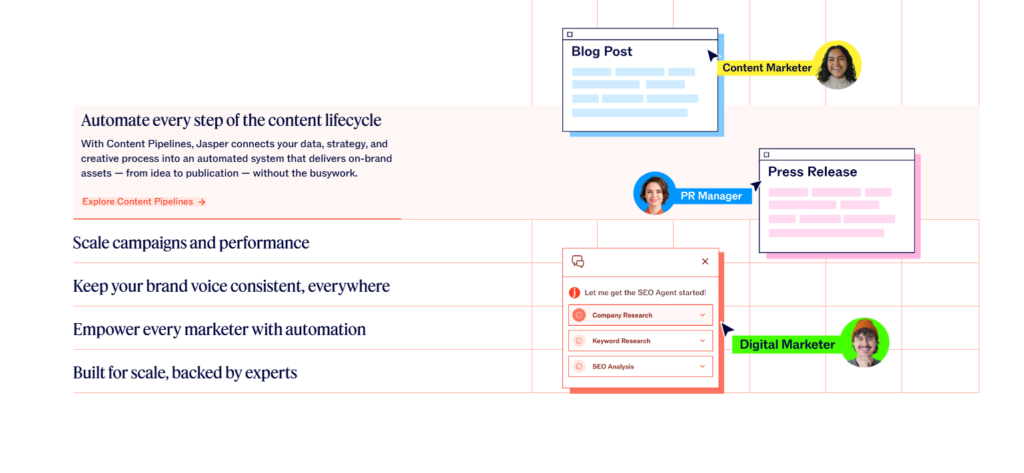
Jasper has solidified its position as the premier AI co-pilot for enterprise marketing teams. While many tools can generate text, Jasper is built to understand brand identity, strategy, and campaign execution. It moves beyond simple drafting to become a central hub for content operations.
Best Features
- Jasper Brand Voice: This feature allows you to train the AI on your company’s specific tone, style guide, and knowledge base, ensuring every piece of content sounds exactly like your brand.
- Campaign Acceleration: You can turn a single brief into a fully fleshed-out multichannel campaign—including blog posts, social media captions, and email outreach sequences—in minutes.
- Enterprise-Grade Security: Jasper offers robust data privacy measures, ensuring your proprietary information remains safe.
Pros
- Produces high-quality, on-brand content consistently.
- Integrates seamlessly with tools like SurferSEO and Grammarly.
- Offers excellent collaboration features for large teams.
Cons
- The pricing model is geared towards businesses, which might be steep for individual freelancers.
- Requires some initial setup to fully optimize the Brand Voice feature.
2. Zapier: The Glue of the Internet
Zapier remains the undisputed king of connecting disparate apps. In 2026, its AI capabilities have expanded significantly, allowing for “Zaps” (automated workflows) that are more intuitive and complex than ever before. It acts as the bridge between your favorite tools, ensuring data flows smoothly without manual intervention.
Best Features
- Natural Language Actions: You can now describe the workflow you want in plain English, and Zapier’s AI will build the automation for you.
- Thousands of Integrations: Connects with over 6,000 apps, meaning almost any tool in your stack can talk to any other tool.
- Multi-Step Zaps: Create complex workflows with logical paths and filters to handle intricate business processes.
Pros
- Extremely user-friendly interface; no coding knowledge required.
- Massive library of pre-built templates to get you started quickly.
- Reliable uptime and execution.
Cons
- Costs can escalate quickly if you have high-volume task requirements.
- Troubleshooting complex multi-step Zaps can sometimes be tricky for beginners.
3. HubSpot: The All-in-One CRM Powerhouse
HubSpot has long been a leader in CRM, but its integration of AI features has transformed it into a holistic automation platform for sales automation, marketing, and service. It eliminates the silos between departments, ensuring a unified view of the customer journey.
Best Features
- ChatSpot: An AI-powered conversational bot that allows you to ask questions about your CRM data, draft emails, and generate reports using natural language commands.
- Content Assistant: embedded directly into the platform, helping you draft emails, blog posts, and landing page copy without switching tabs.
- Predictive Lead Scoring: Uses machine learning to analyze historical data and identify which leads are most likely to convert, helping sales teams prioritize their efforts.
Pros
- A comprehensive suite of tools eliminates the need for multiple disparate subscriptions.
- Excellent educational resources and community support.
- Scales easily from small startups to large enterprises.
Cons
- The platform can become expensive as you add more hubs and contacts.
- The sheer number of features can present a steep learning curve for new users.
4. UIPath: The Robotic Process Automation (RPA) Giant
For organizations dealing with repetitive, rule-based tasks, UIPath is the industry standard. It uses software robots—or “bots”—to mimic human interactions with digital systems. In 2026, UIPath has integrated generative AI to handle unstructured data, making its bots smarter and more adaptable.
Best Features
- Document Understanding: AI models that can extract data from complex documents like invoices, receipts, and contracts with high accuracy.
- Task Mining: Analyzes user activities to identify repetitive processes that are ripe for automation.
- AI Center: Allows you to easily deploy and manage machine learning models within your automation workflows.
Pros
- Drastically reduces human error in data entry and processing.
- Frees up employees to focus on high-value, strategic work.
- Highly compliant and secure, making it ideal for finance and healthcare sectors.
Cons
- Implementation often requires specialized technical knowledge or developer support.
- Can be “overkill” for simple automation needs.
5. Midjourney: The Visual Creative Partner
When it comes to visual content generation, Midjourney stands apart for its artistic capability. It allows designers and marketers to create stunning, high-resolution images from text prompts. By 2026, its consistency and control features have improved, making it a viable tool for corporate branding and asset creation.
Best Features
- Style Tuner: Allows users to fine-tune the aesthetic of the output to match specific brand guidelines or artistic preferences.
- Image Upscaling: Generates high-definition images suitable for print and large-format digital displays.
- Variation Mode: Quickly produces multiple iterations of a concept, speeding up the brainstorming and design process.
Pros
- Produces best-in-class artistic results that often indistinguishable from human-created art.
- Continuous updates and community-driven improvements.
- Cost-effective alternative to stock photography subscriptions.
Cons
- Operates primarily through a Discord interface, which can be clunky for some professional workflows.
- Copyright laws regarding AI-generated art are still evolving, requiring careful usage policies.
6. Otter.ai: The Intelligent Meeting Assistant
Meetings are necessary, but the administrative work surrounding them is not. Otter.ai automates the transcription and summarization of meetings, ensuring that key insights are captured and action items are assigned without anyone having to take manual notes.
Best Features
- OtterPilot: Automatically joins Zoom, Google Meet, or Microsoft Teams calls to record, transcribe, and summarize the conversation in real-time.
- Automated Summaries: Generates concise summaries of long meetings, highlighting key decisions and action items.
- Speaker Identification: Accurately distinguishes between different speakers, making transcriptions easy to follow.
Pros
- Saves hours of manual note-taking and follow-up work.
- Searchable transcripts make it easy to find specific information from past meetings.
- Improves accessibility for team members who prefer reading over listening.
- Generates text for your copywriter to use directly or in generative AI prompts.
Cons
- Transcription accuracy can drop with poor audio quality or heavy accents.
- Free plan has limitations on recording minutes per month.
7. GrammarlyGO: The Communication Guardian
Grammarly has evolved from a simple spell-checker into a sophisticated AI writing partner. GrammarlyGO brings context-aware generative AI to your communication, helping you compose, rewrite, and reply to emails and documents with the appropriate tone and clarity.
Best Features
- Contextual Understanding: Analyzes the email thread or document you are working on to suggest relevant responses and improvements.
- Tone Detector: visualizes how your message sounds (e.g., confident, friendly, concerned) and offers suggestions to adjust it.
- Personalized Writing Style: Learns your unique writing patterns to provide suggestions that sound like you.
Pros
- Works across almost all desktop applications and browsers.
- Helps maintain professional standards and avoids embarrassing errors.
- Great for non-native English speakers to improve fluency.
Cons
- Can sometimes be overly prescriptive or misunderstand creative stylistic choices.
- Privacy concerns exist for organizations handling highly sensitive data, though enterprise plans offer enhanced security.
8. Drift: The Conversational Marketing Platform
Drift focuses on B2B conversations, using AI to engage website visitors and qualify leads 24/7. It moves beyond standard chatbots by using AI to understand intent and deliver personalized experiences that drive revenue.
Best Features
- Conversational AI: Engages visitors in natural, human-like conversations to answer questions and book meetings for sales reps.
- Intel: Identifies anonymous website visitors and de-anonymizes them using reverse IP lookup, alerting sales reps when target accounts are active.
- Deal Room: collaborative spaces where sales reps and buyers can share documents and communicate throughout the sales cycle.
Pros
- Significantly increases lead conversion rates from website traffic.
- Shortens the sales cycle by instantly qualifying buyers.
- Provides valuable insights into buyer intent and behavior.
Cons
- Premium pricing puts it out of reach for many small businesses.
- Requires ongoing optimization to ensure the bot’s responses remain relevant.
9. ClickUp: The Productivity Hub
ClickUp markets itself as the “one app to replace them all,” and its AI features back that claim up. It integrates project management, docs, whiteboards, and more, using AI to automate the busywork associated with managing tasks and teams.
Best Features
- AI Summaries: instantly summarizes long comment threads, task descriptions, and documents.
- Automated Subtasks: AI can analyze a task description and automatically generate a checklist of subtasks required to complete it.
- Natural Language Search: Find any file, task, or chat message using conversational queries.
Pros
- Highly customizable platform that adapts to any workflow (Agile, Waterfall, etc.).
- Consolidates multiple tools into one, reducing software bloat.
- Aggressive development cycle means new features are added constantly.
Cons
- The interface can be cluttered and overwhelming due to the sheer number of features.
- Mobile app performance can sometimes lag behind the desktop experience.
10. Descript: The Video Editor for Non-Editors
Video content is essential, but editing is traditionally time-consuming and technical. Descript changes the paradigm by allowing you to edit video by editing text. You simply edit the transcript, and the video changes to match.
Best Features
- Overdub: Creates a realistic AI voice clone of you, allowing you to fix audio mistakes by typing the new words rather than re-recording.
- Studio Sound: Uses AI to remove background noise and enhance voice quality, making mediocre audio sound like it was recorded in a pro studio.
- Filler Word Removal: Automatically detects and removes “ums,” “uhs,” and “likes” with a single click.
Pros
- Makes video editing accessible to anyone with word processing skills.
- Drastically speeds up the post-production process for podcasts and video content.
- Innovative features that solve common creator headaches.
Cons
- Not a replacement for high-end NLEs (Non-Linear Editors) like Premiere Pro for complex visual effects.
- Transcription is generally good but requires review for perfect accuracy.
Selecting the Right Tools for Your Future
The landscape of AI automation in 2026 is vast, but the goal remains simple: to remove friction from your work. The tools listed above represent the best in their respective categories, but the “best” tool is ultimately the one that your team actually uses.
Don’t try to overhaul your entire tech stack overnight. Start by identifying the biggest bottlenecks in your current workflow. Is your sales team spending too much time on data entry? Look at HubSpot. Is your marketing team struggling to produce content at scale? Jasper is your answer. Are administrative tasks eating up your week? Zapier or UIPath can help.
Implementation is a journey. Start with a pilot program, gather feedback, and iterate. The businesses that will dominate their industries in the coming years are not necessarily the ones with the most AI tools, but the ones that have integrated them most effectively into a cohesive, human-centric strategy.
